

AI Hairstyle Changer

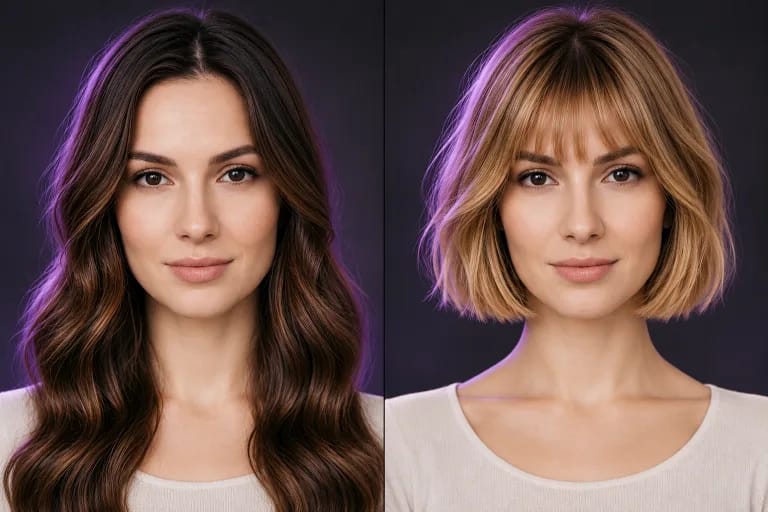
Upload a selfie, then pick a preset hairstyle, switch the hair color, or type out the look you want. Your face, skin tone, and the lighting in the original photo stay as they were, so what you see is close to what you would actually walk out with.

A woman with long layered brown hair before trying a new hairstyle.Example
A new look, still you

Find the hair you want to wear.

Choose a clear photo with your face and hair in view.

Hairstyle
Hair color

Upload your photo to try this look.

How to Use the AI Hairstyle Changer

Three steps, and you do not need to know anything about photo editing.

Step 1 Upload Your Selfie

Any clear photo of your face works. Front-facing shots with your current hair fully visible give the cleanest swap, and good light helps more than a good camera does.

Step 2 Pick a Style or Describe One

Choose from the preset hairstyles and hair colors, or type out what you want in the prompt box. Presets are faster when you already know the name of the cut. The prompt box is better when you have a picture in your head but not a word for it, something like "shoulder-length with curtain bangs, slightly undone."

Step 3 Compare and Decide

The result comes back next to your original photo so you can look at both at once. That side-by-side is the part that actually answers the question, because a haircut can look good on its own and still not look like you.

Why Preview a Haircut Before You Commit

  • See It Before It Is Permanent

    A bad cut grows out in months, not days. Looking at the style on your own face first costs you nothing and takes a minute, which is a better trade than finding out in the mirror at the salon.

  • Judge It Against Your Own Face

    A cut that works on a model with a long oval face can sit completely differently on a round or square one. Reference photos from Pinterest show you the haircut. This shows you the haircut on you, with your face shape, your hairline, and your features.

  • Try Styles You Would Not Have Asked For

    Most people bring the same three ideas to the salon. Running through a dozen presets takes a few minutes and sometimes the one that works is a style you would never have picked off a chart.

  • Have Something to Show at the Salon

    Describing a haircut in words often goes wrong. Walking in with an image of the cut already on your own head removes most of the guesswork for whoever is holding the scissors.

Features of the SwapFace Hairstyle Tool

  • Results in Seconds

    A swap finishes in a few seconds, so you can run through several styles in the time it would take to scroll a lookbook.

  • Free Credits to Start

    New accounts get free credits, enough to try the tool properly before deciding whether to pay for more. No card needed to use them.

  • Your Own Face, Not a Lookalike

    Only the hair changes. Your features, skin tone, and the lighting in the original photo stay where they were, which is what makes the preview worth trusting. A result that looks great but looks like someone else tells you nothing.

  • Works Across Hair Types and Lengths

    Short to long, straight to tightly curled, and color changes on top of a cut. Textured and curly hair holds its pattern instead of being smoothed into something generic.

FAQs

1.What is an AI hairstyle changer?

It is a tool that puts a different haircut on a photo of you. You upload a selfie, choose a style, and it returns the same photo with the new hair, keeping your face and the original lighting. There is no app to install and nothing touches your actual hair.

2.Is it free to try?

Yes. Every new account comes with free credits, and you can spend them on whatever styles you want to see. Paid plans are there if you run out and want to keep going, and you can decide that after you have seen the output quality.

3.How realistic are the results?

Close enough to make a decision with. The hairline sits where yours does and the lighting matches the photo you uploaded, so the result reads as a photo rather than a filter. Clear, front-facing selfies in even light come out best. Very dark photos, heavy angles, and hair that is mostly hidden under a hat or hood give the tool less to work with.

4.Is it safe to use?

Yes. Your photos are deleted automatically after 24 hours and nothing you upload is used to train any model. The results are yours to download and keep.

5.Can I show the result to my hairdresser?

That is one of the better reasons to use it. Download the image and bring it in. A stylist can see the length, the layers, and how the cut sits against your face, which is far more useful than a phone full of photos of other people.

Icon Credits 0